
Obstacle-Avoiding Robot: Working Principle, Components, and School Project Guide
An obstacle-avoiding robot is an exciting robotics project that demonstrates how machines can detect objects and move around them automatically. It is a popular STEM activity for school students because it combines science, technology, engineering, and programming in one practical experiment.
Students can build a small robot car that moves forward, detects an obstacle in its path, and changes direction to avoid a collision. This project introduces important robotics concepts, including sensors, motors, electronic circuits, and decision-making.
Whether you are preparing a school science exhibition, a technology assignment, or a beginner robotics experiment, this guide explains how an obstacle-avoiding robot works, which components are required, how to build one, and how it can be improved.
What Is an Obstacle-Avoiding Robot?
An obstacle-avoiding robot is an autonomous mobile robot designed to detect objects in its path and change its movement to avoid them.
Unlike a basic remote-controlled car, an obstacle-avoiding robot can respond to its surroundings without requiring a person to control every movement.
For example, when the robot moves toward a wall, a chair, or a cardboard box, its sensor detects the object. The controller processes the sensor’s information and instructs the motors to stop, turn, or move in another direction.
Obstacle-avoiding robots are useful educational examples of autonomous navigation and automated decision-making.
How Does an Obstacle-Avoiding Robot Work?
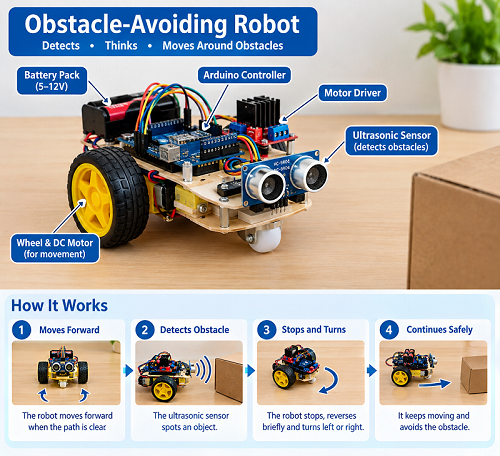
The robot operates through four main stages: movement, detection, processing, and action.
1. Movement
The robot moves forward using electric motors connected to its wheels. The motors receive power through a battery and are controlled by an electronic motor driver.
2. Obstacle Detection
An ultrasonic sensor is commonly used to measure the distance between the robot and an object. It sends out high-frequency sound pulses and measures how long the reflected sound takes to return.
3. Decision-Making
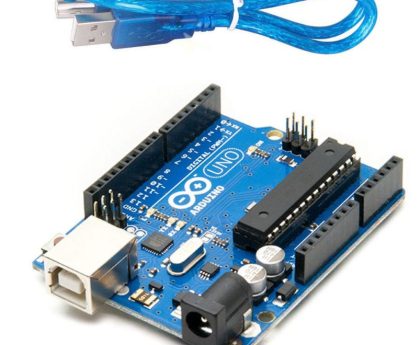
A microcontroller, such as an Arduino-compatible board, receives the sensor measurement and runs a programmed set of instructions.
For example, the program may tell the robot to continue moving when the path is clear and turn when an object is detected within a specified distance.
4. Direction Change
The controller sends signals to the motor driver, which changes the movement of the wheels. The robot can stop, reverse, turn left, or turn right, depending on its design and program.
This process repeats as the robot moves, allowing it to respond to obstacles along its route.
Components Required to Build an Obstacle-Avoiding Robot
The following components are commonly used in an Arduino-based obstacle-avoiding robot.
| Component | Function |
|---|---|
| Arduino-compatible controller | Processes sensor data and controls movement |
| Ultrasonic distance sensor | Detects obstacles and measures distance |
| Robot chassis | Supports the electronic components |
| DC motors | Drive the wheels |
| Wheels | Allow the robot to move |
| Motor driver module | Controls motor direction and operation |
| Battery pack | Supplies electrical power |
| Jumper wires | Connect the electronic components |
| Breadboard, if required | Helps make temporary circuit connections |
| Caster wheel, if required | Supports the robot’s balance |
The exact components depend on the selected robot kit. Some kits include a controller, motor driver, chassis, wheels, sensors, and connecting wires in one package.
For a school project in the UAE, students can compare locally available educational robotics kits and select one that fits their budget. A complete programmable model may cost more than a basic cardboard or electronic display project.
Step-by-Step Guide to Building an Obstacle-Avoiding Robot
Step 1: Assemble the Chassis
Attach the DC motors and wheels to the robot chassis according to the manufacturer’s instructions. Make sure the wheels rotate freely and the chassis is balanced.
Step 2: Install the Ultrasonic Sensor
Mount the ultrasonic sensor at the front of the robot. Position it so that it can detect objects directly ahead without being blocked by the chassis.
Step 3: Connect the Controller and Motor Driver
Connect the controller, sensor, and motor driver using the wiring diagram supplied with the kit. The motor driver allows the controller to operate the motors without powering them directly from its signal pins.
Check all connections before supplying power.
Step 4: Install the Battery
Connect the recommended battery or power source according to the kit instructions. Confirm that the voltage and polarity match the specifications of the electronic components.
Step 5: Program the Robot
Write or upload a program that reads the distance sensor and controls the motors.
A basic control strategy might be:
- If the path is clear, move forward.
- If an obstacle is detected nearby, stop.
- Reverse briefly if needed.
- Turn left or right.
- Measure the distance again and continue.
The precise instructions and pin connections depend on the hardware being used.
Step 6: Test the Robot
Place the robot on a flat surface with enough room to move. Put a soft obstacle, such as a cardboard box, in front of it.
Observe whether the robot detects the object and changes direction. Adjust the detection distance and turning duration if necessary.
Step 7: Prepare the School Display
For a science exhibition, place the robot on a cardboard base and label its major components. Add a simple diagram explaining how the sensor, controller, motor driver, and wheels work together.
Students can also create a small obstacle course using lightweight cardboard objects.
Basic Algorithm for an Obstacle-Avoiding Robot
The following pseudocode explains the robot’s decision-making process without depending on a particular programming language.
START

Measure distance to the object

IF distance is greater than the safety threshold:
    Move forward
ELSE:
    Stop
    Reverse briefly
    Turn left or right

Repeat the process

END
The safety threshold is the distance at which the robot begins avoiding an obstacle. It should be adjusted according to the robot’s speed, sensor performance, and available stopping distance.
This simple algorithm helps students understand how sensors and programmed conditions control a machine.
Applications of Obstacle-Avoiding Robots
Obstacle avoidance is an important capability in mobile robotics. Similar principles are used in a variety of applications.
1. Warehouse Robots
Some autonomous mobile robots use sensors and navigation systems to detect obstacles and move goods around warehouses. Real industrial systems may use multiple sensors and more advanced mapping technology.
2. Robotic Vacuum Cleaners
Robotic vacuum cleaners use sensors and navigation methods to detect walls, furniture, and other objects while cleaning rooms.
3. Delivery Robots
Some delivery robots use cameras, distance sensors, and navigation software to move around people and objects in suitable environments.
4. Educational Robotics
Schools and training centres use small obstacle-avoiding robots to teach students about programming, electronics, sensors, and engineering design.
5. Research and Exploration
Obstacle detection and avoidance are important in research involving autonomous vehicles, mobile robots, and robots designed to operate in unfamiliar environments.
A simple school robot demonstrates the basic concept, but real-world systems require more sophisticated sensing, navigation, and safety features.
Benefits of Building an Obstacle-Avoiding Robot
Building an obstacle-avoiding robot offers several educational benefits.
- Practical STEM learning: Students combine science, mathematics, electronics, and engineering.
- Programming experience: They learn how conditions and instructions control a machine.
- Problem-solving skills: Testing helps students identify and correct design errors.
- Understanding sensors: Students discover how machines gather information from their surroundings.
- Creativity and innovation: They can modify the robot’s behaviour and design.
- Teamwork: Students can share tasks such as assembling, programming, testing, and presenting.
For younger students, an adult can handle the wiring and programming while the student focuses on understanding the components, observing the robot, and explaining its operation.
How to Improve an Obstacle-Avoiding Robot
Once the basic model works, students can add features to make it more interesting.
Add a Servo-Mounted Sensor
A servo motor can rotate the distance sensor to check different directions. The robot can compare distances on the left and right before choosing a turn.
Add LED Indicators
Use LEDs to indicate the robot’s status. For example, a green LED could represent a clear path, while a red LED could indicate that an obstacle has been detected.
Add a Buzzer
A buzzer can produce a sound when the robot approaches an obstacle. This feature makes the robot’s behaviour easier to observe during a school demonstration.
Improve Navigation
More advanced projects can use additional sensors, wheel encoders, or mapping techniques to navigate more effectively. These improvements require extra hardware or programming.
Create a Smart Robot Display
Students can build a miniature road or smart-city layout and demonstrate how the robot moves around obstacles. The display can include road signs, buildings, pedestrian crossings, and a project explanation board.
Safety Precautions
Safety is important when building any electronic school project.
- Follow the manufacturer’s wiring and voltage instructions.
- Ask an adult to supervise wiring, battery installation, and programming setup.
- Keep fingers, loose clothing, and wires away from moving wheels.
- Use only the specified battery or power supply.
- Do not connect batteries directly across power terminals.
- Keep the robot away from stairs, water, and fragile objects.
- Disconnect the power before changing circuit connections.
An obstacle-avoiding robot is an educational model, not a guaranteed collision-prevention or safety device.
Conclusion
An obstacle-avoiding robot is an excellent introduction to robotics and autonomous movement. By combining a distance sensor, controller, motor driver, and electric motors, students can build a machine that detects objects and changes direction automatically.
The project encourages practical learning, programming skills, creativity, and problem-solving. It can begin with a simple robot car and gradually develop into a more advanced system with rotating sensors, warning lights, sound alerts, and improved navigation.
For students in the UAE, this project can be a useful addition to a school science exhibition, STEM assignment, or robotics competition. The most important part is not building the most complicated robot, but understanding how its components work together and explaining the result clearly.
Frequently Asked Questions
What is an obstacle-avoiding robot?
An obstacle-avoiding robot is a mobile robot that uses sensors and programmed instructions to detect objects and change direction to avoid them.
Which sensor is used in an obstacle-avoiding robot?
An ultrasonic distance sensor is commonly used in beginner robot cars. Other designs may use infrared sensors, cameras, or additional distance sensors.
Can a Class 2 student build an obstacle-avoiding robot?
Yes, with adult assistance. A preassembled or beginner-friendly educational kit is usually more suitable than a project requiring extensive wiring and programming.
Does an obstacle-avoiding robot require Arduino?
No. Arduino is one popular option, but compatible educational controllers and robotics platforms can perform the same basic function.
How much does an obstacle-avoiding robot cost in the UAE?
The cost varies depending on the controller, sensors, motors, chassis, battery, and included accessories. A basic display model can be inexpensive, while a complete programmable robot may cost more than AED 100. Check current local prices before purchasing.
What is the difference between an obstacle-avoiding robot and a line-following robot?
An obstacle-avoiding robot detects objects and changes direction to avoid them. A line-following robot uses sensors to follow a marked line or path.
What can students learn from this project?
Students can learn about sensors, microcontrollers, motor control, simple algorithms, electronic circuits, testing, and engineering problem-solving.
Is an obstacle-avoiding robot an example of artificial intelligence?
A basic obstacle-avoiding robot usually follows predefined rules and does not require artificial intelligence. More advanced robots may combine obstacle avoidance with AI-based vision or navigation.